[c#]取得GA4 報表資訊
近來由於「通用GA」要停止服務了,因此有將原來取「通用GA」報表改為取「GA4」報表的需求。不過現在官方好像還沒有一個[release]版本做使用,因此我採用[Beta]版本來實做此次功能的變更。
實做:
其實蠻簡單的,跟「通用GA」的寫法大致雷同,一樣是設定「Dimensions、Metrics、DateRanges」的方式來取得報表資料。
步驟一 Nuget 安裝「Google.Analytics.Data.V1Beta」
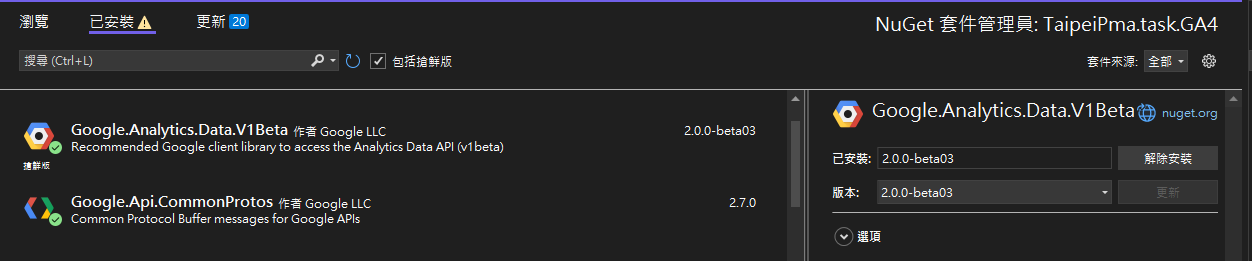
步驟二 建立與 服務帳戶 的連線
// Using a default constructor instructs the client to use the credentials
// specified in GOOGLE_APPLICATION_CREDENTIALS environment variable.
BetaAnalyticsDataClient client = new BetaAnalyticsDataClientBuilder
{
    CredentialsPath = _GA4KeyPath//服務帳戶 金鑰 Json檔
}.Build();
步驟三 建立 Request 資訊
// Initialize request argument(s)
RunReportRequest request = new RunReportRequest()
{
   Property = "properties/" + _propertyId,//GA4-PROPERTY-ID
   Dimensions = { new Dimension { Name = "date" }, },
   Metrics = { new Metric { Name = "screenPageViews" } },
   DateRanges = { new DateRange { StartDate = "2020-03-31", EndDate = "today" }, },
};
步驟四 執行 查詢 報表
// Make the request
var response = client.RunReport(request);
All Code
// Using a default constructor instructs the client to use the credentials
// specified in GOOGLE_APPLICATION_CREDENTIALS environment variable.
BetaAnalyticsDataClient client = new BetaAnalyticsDataClientBuilder
{
    CredentialsPath = _GA4KeyPath//服務帳戶 金鑰 Json檔
}.Build();
// Initialize request argument(s)
RunReportRequest request = new RunReportRequest()
{
   Property = "properties/" + _propertyId,//GA4-PROPERTY-ID
   Dimensions = { new Dimension { Name = "date" }, },
   Metrics = { new Metric { Name = "screenPageViews" } },
   DateRanges = { new DateRange { StartDate = "2020-03-31", EndDate = "today" }, },
};
// Make the request
var response = client.RunReport(request);
相關參考:
[C#] 使用 Google Analytics 取得 report資訊

留言
張貼留言